Ball Bounce Metadata Machine Learning
This tutorial is built on top of the Ball Bounce VVUQ tutorial by creating a machine learning model using the metadata added to the simulation ensembles.
Overview
In the previous LSTM and Transformer tutorials we trained the models to predict the transient behavior of a simulation by giving it the data at the start of the simulation. This is useful if a user is interested in gathering the transient simulation data by calling the less expensive LSTM or Transformer model (after it has been trained) rather than the more expensive high fidelity full physics simulation. However, if one is just interested in the end result of the simulation, this end result can be considered the label while the initial conditions of the simulation can be considered the features for a machine learning model. Thus, one can train a machine learning model using these features (initial conditions) and labels (end result). We will use SciKit Learn's machine learning algorithms for this tutorial.
Changes to Ball Bounce VVUQ tutorial
Same changes as the Ball Bounce LSTM tutorial.
Visualization Metadata Machine Learning Kosh Notebook
This notebook allows the user to train a machine learning model and visualize its predictions. The notebook can be updated as needed to modify the machine learning model and post-process the prediction results. The notebook automatically gets converted to a Python script using the command jupyter nbconvert --to script $(SPECROOT)/*.ipynb in the metadata-machine-learning-ball-bounce step so there is no need to manually export it to a script. The notebook has more details on what training a machine learning model entails.
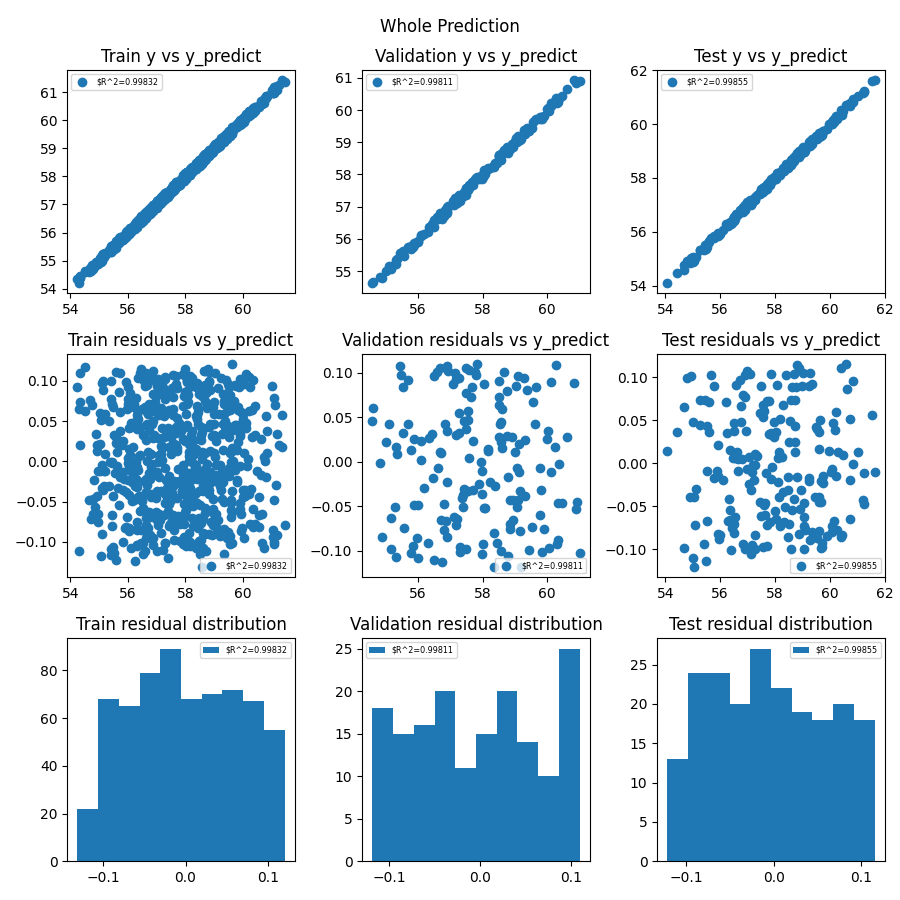
Below is the plot of the machine learning model prediction and its true value for comparison. This is where fine tuning the model becomes an "art" since adjusting these values could give a completely different prediction. What works for this set of ensembles might not work for another. Note that due to the randomness of the data split, the predictions below will not be the same each time.
How to run
-
Run
setup.shin the top directory to create a virtual environment with all necessary dependencies and install the jupyter kernel. -
Run
source weave_demos_venv/bin/activateto enter the virtual environment (you candeactivatewhen you've finished the demo to exit it) andcdback into this directory. -
Follow the steps below.
- Run
merlin run ball_bounce_suite_merlin_metadata_machine_learning.yaml --pgen pgen_ensembles.pyandmerlin run-workers ball_bounce_suite_merlin_metadata_machine_learning.yaml- Change
NUM_STUDIES = 1024to a smaller number depending on computer capability (e.g. 64) inpgen_ensembles.py
- Change
-
Run
visualization_metadata_machine_learning_kosh.ipynb- Update the machine learning model and/or update
NUM_STUDIESabove to get more training samples
- Update the machine learning model and/or update
-
Note: If the notebook
visualization_metadata_machine_learning_kosh.ipynbis to your liking, you can just run step 1 above and the updated notebook will automatically be exported as a script.
Content overview
Starting files:
create_store.py: Create store that will be used throughout workflow.ball_bounce.py: The "simulation" script, containing all the logic for bouncing the ball.dsv_to_kosh.py: A bare-bones ingester that finds dsv files and inserts them into a Kosh datastore using the parallel safe threadsafe methods.pgen_ensembles.py: A custom parameter generator for Maestro and Merlin containing the uncertainty bounds of the parameters for the baseline simulation ensemble.ball_bounce_suite_merlin_metadata_machine_learning.yaml: The Merlin workflow description for running the baseline simulation ensemble, consolidating the data into a datastore, and training the machine learning model.visualization_metadata_machine_learning_kosh.ipynb: A Jupyter notebook to train the machine learning model.
Files created by the demo:
ball-bounce-metadata-machine-learningcreate-initial-store: Contains the code to create store.run-ball-bounce/: Contains the baseline simulation ensemble.ingest-ball-bounce/: Contains the code to add the baseline simulation ensemble to the datastore.metadata-machine-learning-ball-bounce/: Contains the images created by the Jupyter notebook.